将Mac网络共享给iPhone / iPad
作者:matrix 被围观: 2,627 次 发布时间:2025-10-31 分类:零零星星 | 一条评论 »
apple 的软件生态做的都很不错,就比如 mac 使用 iPhone 的数据流量上网,直接 Wi-Fi 热点或者 USB线连接就行。
但是 反过来iPhone使用Mac 的网络反而麻烦些。不过好在基本算是支持的 只是我以前一直尝试失败
环境
Mac使用Wi-Fi上网
iPhone无网络,Wi-Fi 无法连接
Step.1. 连接设备
数据线连接iPhone和Mac
Step.2. 开启转发IP Forwarding
Mac开启数据包转发,允许数据包从一个网络接口转发到另一个接口,把 Mac 当成一个路由器来中转流量。
这一步骤很关键=,我之前就是因为这个问题
% sudo sysctl -w net.inet.ip.forwarding=1
net.inet.ip.forwarding: 0 -> 1
step.3. 互联网共享
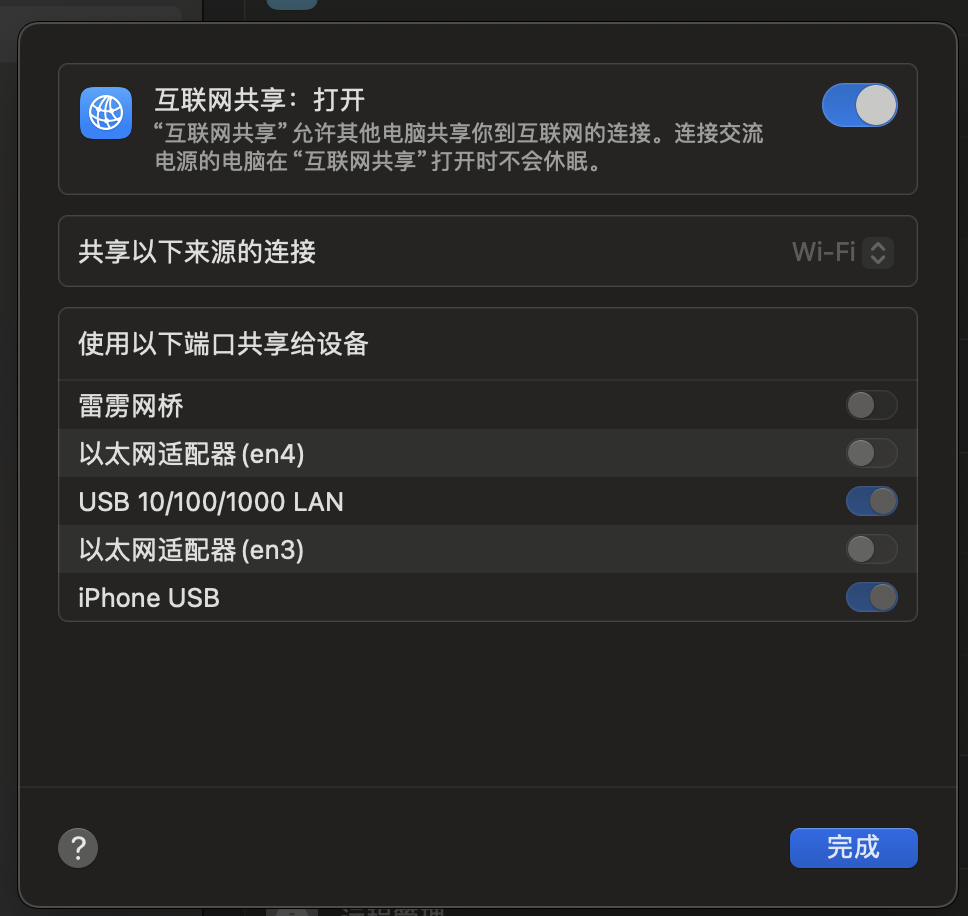
Mac设置中找到「互联网共享」
来源选择「Wi-Fi」
目标设备有「USB」的,我都带上了
之后iPhone就有网络了😂
Excellent explanation of how Docker assigns and manages internal IP addresses. Networking issues can be confusing, especially when private IP ranges overlap with existing infrastructure, so this kind of troubleshooting guide is very useful. I also appreciate that the article focuses on the root cause instead of just providing a quick fix. Understanding Docker's bridge networks, routing behavior, and IP allocation makes it much easier to diagnose connectivity problems and build more reliable containerized environments. Thanks for sharing such a practical and informative write-up for developers and system administrators alike. https://fawanewssc.com/privacy-policy/